We’ve all been there. You find a piece of software that perfectly streamlines your workflow—in this case, the powerful Internet Download Manager (IDM). For 30 days, it works flawlessly, but then the trial period ends, and your downloads grind to a halt. The interruption is frustrating, often pushing users to search for complex patches or third-party tools that can compromise their system’s security.
1. The Fix Is Already on Your PC
The core of this method is that it relies entirely on a built-in Windows utility: the Registry Editor (regedit). Instead of searching for external patches or activators, which can be bundled with malware or unwanted software, this solution leverages the tools your operating system already provides.
This is a significant advantage because it eliminates the security risks and system clutter associated with downloading unknown files from the internet. The entire process is self-contained within your PC. As the source material highlights, the beauty of this approach is its simplicity and safety.
…you won’t need to download any extra software just a simple trick using Windows built-in tools…
2. A Specific Folder Holds the Key
The “magic” behind this trial reset lies in locating and deleting a specific entry within the Windows Registry.
A quick word of caution: The Registry Editor is a powerful tool. Be sure to follow these steps precisely and avoid deleting or changing any other entries, as this could cause system instability.
The reason this fix is tucked away in a specific folder called WOW6432Node is that this is where Windows stores registry information for 32-bit applications (like IDM) that are running on a 64-bit version of the operating system. It’s a clever bit of internal organization that also happens to hold the key to our reset.
Here are the step-by-step instructions for finding the correct folder:
- Press the
Windowskey +Rto open the Run dialog box, then typeregeditand press Enter. - In the folder tree on the left side of the Registry Editor, find and click the small arrow next to
HKEY_USERSto expand it. - Navigate down the list, expanding S-1-5-21-3759929318-2392819992-802295856-1001_Classes
- Navigate down the list, expanding
WOW6432Nodeand then CLSID in the same way. - Within
WOW6432Node, find and expand theCLSIDfolder.
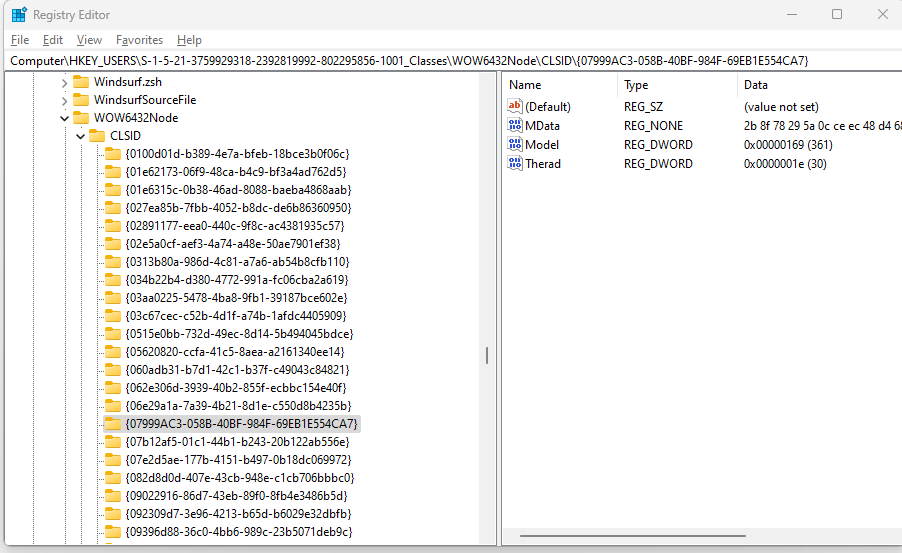
Inside this CLSID folder, you are looking for another folder-like entry whose name is a long string of characters inside curly braces. According to the tutorial, you need to find the one that starts with {07 and ends with A7}. Right-click on this specific entry and select “Delete.” Once that entry is removed, the trial is reset.
3. It’s Over in Just a Few Clicks
Perhaps the most surprising aspect of this technique is how quick and simple it is. The idea of editing the Windows Registry sounds complicated, but the entire procedure can be completed in less than a minute. It’s a classic “aha!” moment when you realize that a problem that seemed to require a complex fix can be solved with just a few precise clicks.
This method stands in stark contrast to more convoluted solutions, reinforcing the idea that effectiveness doesn’t always mean complexity.
…super easy method to reset your IDM trial without any downloads
Conclusion: A Final Thought on Empowerment
Ultimately, this simple trick does more than just reset a software trial; it demonstrates that sometimes the most powerful solutions are the ones that leverage the tools we already have at our disposal. By understanding a little more about how your operating system works, you can solve problems efficiently and securely.
It leaves one to wonder: what other simple, effective “tricks” are hidden just beneath the surface of our operating systems, waiting to be discovered?