
Table of Contents
Discover the best folder structure for full stack web development to build scalable, maintainable projects. Perfect for MERN, MEAN, and modern stacks.
Professional folder structure for developers: Introduction
When I started working on my first full stack framework project, I made the mistake of throwing all files into a single directory. It worked fine for the first week, but as soon as features started piling up, debugging and collaboration turned into chaos.
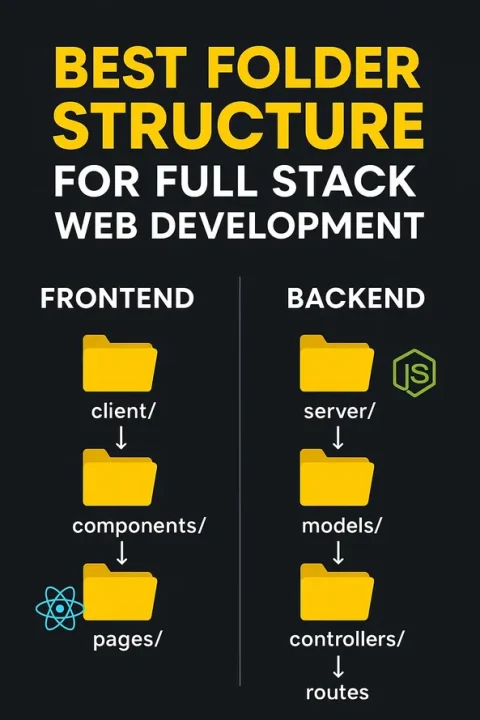
That’s when I realized: having the best folder structure for full stack web development is just as important as writing clean code. Without it, even small apps can become unmaintainable.
In this guide full stack developer how to become, I’ll share a battle-tested folder structure I’ve used across React, Node.js, and MERN stack projects—designed for scalability, maintainability, and team collaboration.
Why Folder Structure Matters in Full Stack Projects
Over the years, I’ve noticed that teams that skip folder organization face the same issues:
- Hard to scale → Adding new features breaks old ones.
- Poor maintainability → New developers spend weeks just figuring out where things live.
- Slow collaboration → Everyone uses a different convention.
- Debugging nightmares → Locating a bug becomes a scavenger hunt.
According to Stack Overflow’s Developer Survey, code organization and maintainability are among the top pain points in software projects.
General Principles I Follow
From my experience, these principles keep a project healthy:
- Separation of Concerns → Never mix frontend and backend code.
- Consistency → Use the same naming convention across files.
- Modularity → Group related code together (routes, models, controllers).
- Scalability → A structure that works for 5 files should also work for 500.
- Clarity → Every folder should have a single, clear purpose.
My Recommended Folder Structure
Here’s the structure I’ve refined across real-world projects (especially in Node.js + React/MERN setups):
project-root/
│
├── client/             # Frontend (React, Angular, Vue)
│   ├── public/
│   ├── src/
│   │   ├── assets/
│   │   ├── components/
│   │   ├── pages/
│   │   ├── hooks/
│   │   ├── context/
│   │   ├── utils/
│   │   ├── services/
│   │   ├── styles/
│   │   └── index.js
│   └── package.json
│
├── server/             # Backend (Node.js, Express, Django, etc.)
│   ├── config/
│   ├── controllers/
│   ├── models/
│   ├── routes/
│   ├── middleware/
│   ├── services/
│   ├── utils/
│   ├── tests/
│   └── server.js
│
├── shared/             # Code shared between frontend and backend
│   ├── constants/
│   ├── types/
│   └── validations/
│
├── scripts/            # Deployment & automation scripts
│
├── .env
├── .gitignore
├── README.md
└── package.json
Breaking Down the Frontend
In my React projects, this is how I structure client/src/:
components/→ Reusable UI parts (e.g., Button, Navbar).pages/→ Route-level components (e.g., Home, Dashboard).hooks/→ Custom React hooks (e.g.,useAuth.js).context/→ Global state (React Context, Redux).services/→ API calls (fetch/axios).utils/→ Helper functions (formatters, validators).styles/→ Global styles (Tailwind, CSS Modules).
Example: In one project, moving all API calls to services/ made it way easier to swap from Axios to Fetch when requirements changed.
Breaking Down the Backend
Here’s how I organize Node.js/Express backends:
config/→ Database configs, environment setups.controllers/→ Business logic for routes.models/→ Database schemas (MongoDB Mongoose models, SQL tables).routes/→ API endpoints.middleware/→ Auth, validation, logging.services/→ Email service, file uploads, cron jobs.utils/→ Helper functions (JWT, hashing).tests/→ Jest/Mocha unit & integration tests.
Personal Tip: Keeping authentication logic inside middleware/ has saved me countless hours of debugging permission issues.
Shared Folder Best Practices
In larger projects, I always add a shared/ directory for code both frontend and backend need:
- Constants → API routes, app-wide enums.
- Validation → Schema validation (e.g., using Joi or Zod).
- Types/Interfaces → Great for TypeScript projects.
This eliminates duplication and keeps frontend and backend in sync.
Advanced Considerations (From Real Projects)
- Monorepo Setup → I’ve used Nx and Turborepo to manage client and server in one repo. Makes CI/CD faster.
- Microservices → For one fintech project, we split backend into microservices, each following the same structure.
- Dockerization → I usually add a
/docker/folder with Dockerfiles anddocker-compose.yml. - Testing Strategy → I prefer colocating unit tests with code but keep integration tests in
/tests/.
Example Workflow in Practice
Here’s how it usually flows in my projects:
- Build UI inside
client/src/pages/. - API requests handled in
client/src/services/. - Backend routes in
server/routes/forward to controllers. - Controllers use
server/models/for database ops. - Shared validation ensures consistent input handling across frontend & backend.
This workflow has saved me from “it works on frontend but not on backend” bugs.
Common Mistakes I See Developers Make
- Mixing frontend and backend in the same folder.
- Forgetting
.gitignoreand committing.envfiles (a security nightmare). - Hardcoding credentials instead of using environment variables.
- No test structure → hard to ensure reliability.
- Over-engineering small projects with overly complex structures.
E-commerce Website Folder Structure
Frontend Folder Structure (React + TypeScript, Vite)
client/
└── src/
    ├── app/                      # App shell & global setup
    │   ├── App.tsx
    │   ├── main.tsx
    │   ├── routes.tsx            # Route config (lazy-loaded)
    │   ├── providers/            # Context providers bootstrapped once
    │   │   ├── QueryProvider.tsx # React Query setup
    │   │   ├── StoreProvider.tsx # Redux/Zustand provider (if used)
    │   │   └── ThemeProvider.tsx
    │   └── config/
    │       ├── env.ts            # Read VITE_* env vars
    │       └── constants.ts
    │
    ├── pages/                    # Route-level pages (no heavy logic)
    │   ├── home/
    │   │   ├── HomePage.tsx
    │   │   └── hero.json         # Example localized content
    │   ├── catalog/
    │   │   ├── CatalogPage.tsx
    │   │   └── facets.config.ts  # Facet filters config
    │   ├── product/
    │   │   └── ProductPage.tsx
    │   ├── cart/
    │   │   └── CartPage.tsx
    │   ├── checkout/
    │   │   ├── CheckoutPage.tsx
    │   │   └── steps.config.ts   # Stepper config
    │   ├── account/
    │   │   ├── AccountPage.tsx
    │   │   └── OrdersPage.tsx
    │   ├── auth/
    │   │   ├── LoginPage.tsx
    │   │   └── RegisterPage.tsx
    │   ├── admin/
    │   │   ├── AdminDashboardPage.tsx
    │   │   ├── ProductsAdminPage.tsx
    │   │   └── OrdersAdminPage.tsx
    │   └── errors/
    │       ├── NotFoundPage.tsx
    │       └── ErrorBoundary.tsx
    │
    ├── features/                 # Feature-sliced domain logic (smart components)
    │   ├── product/
    │   │   ├── components/
    │   │   │   ├── ProductCard.tsx
    │   │   │   ├── ProductGallery.tsx
    │   │   │   └── PriceTag.tsx
    │   │   ├── api/
    │   │   │   ├── product.api.ts        # fetchProductById, listProducts
    │   │   │   └── product.types.ts
    │   │   ├── hooks/
    │   │   │   ├── useProduct.ts
    │   │   │   └── useProducts.ts
    │   │   ├── utils/
    │   │   │   └── price.ts              # formatCurrency, discounts
    │   │   └── state/                    # optional Redux slice/Zustand store
    │   │       └── product.slice.ts
    │   │
    │   ├── cart/
    │   │   ├── components/
    │   │   │   ├── CartIcon.tsx
    │   │   │   └── CartDrawer.tsx
    │   │   ├── hooks/
    │   │   │   └── useCart.ts            # addItem, removeItem, totals
    │   │   └── state/
    │   │       └── cart.store.ts         # Zustand or Redux slice
    │   │
    │   ├── checkout/
    │   │   ├── components/
    │   │   │   ├── AddressForm.tsx
    │   │   │   ├── PaymentForm.tsx
    │   │   │   └── OrderSummary.tsx
    │   │   ├── hooks/
    │   │   │   ├── useCheckout.ts
    │   │   │   └── usePayment.ts
    │   │   └── api/
    │   │       └── checkout.api.ts       # createOrder, confirmPayment
    │   │
    │   ├── auth/
    │   │   ├── components/
    │   │   │   └── AuthGuard.tsx
    │   │   ├── hooks/
    │   │   │   ├── useAuth.ts
    │   │   │   └── useOAuth.ts
    │   │   └── api/
    │   │       └── auth.api.ts
    │   │
    │   ├── search/
    │   │   ├── components/
    │   │   │   ├── SearchBox.tsx
    │   │   │   └── Autocomplete.tsx
    │   │   ├── hooks/
    │   │   │   └── useSearch.ts          # debounced, facet filters
    │   │   └── api/
    │   │       └── search.api.ts
    │   │
    │   ├── review/
    │   │   ├── components/
    │   │   │   ├── ReviewList.tsx
    │   │   │   └── ReviewForm.tsx
    │   │   ├── hooks/
    │   │   │   └── useReviews.ts
    │   │   └── api/
    │   │       └── review.api.ts
    │   │
    │   └── admin/
    │       ├── components/
    │       │   ├── ProductTable.tsx
    │       │   └── OrderTable.tsx
    │       ├── hooks/
    │       │   └── useAdminStats.ts
    │       └── api/
    │           └── admin.api.ts
    │
    ├── shared/                   # Cross-feature building blocks
    │   ├── components/
    │   │   ├── ui/               # Design system primitives
    │   │   │   ├── Button.tsx
    │   │   │   ├── Input.tsx
    │   │   │   ├── Select.tsx
    │   │   │   └── Spinner.tsx
    │   │   ├── layout/
    │   │   │   ├── Header.tsx
    │   │   │   ├── Footer.tsx
    │   │   │   └── Container.tsx
    │   │   └── feedback/
    │   │       ├── Toast.tsx
    │   │       └── EmptyState.tsx
    │   ├── hooks/
    │   │   ├── useToggle.ts
    │   │   ├── useDebounce.ts
    │   │   └── usePagination.ts
    │   ├── lib/
    │   │   ├── http.ts            # axios/fetch wrapper w/ interceptors
    │   │   ├── queryClient.ts     # React Query instance
    │   │   └── validation.ts      # Zod/Yup shared validators
    │   ├── store/                 # Global state (if needed)
    │   │   └── store.ts
    │   ├── utils/
    │   │   ├── clsx.ts
    │   │   ├── currency.ts
    │   │   └── date.ts
    │   ├── styles/
    │   │   ├── index.css
    │   │   └── tailwind.css
    │   └── types/
    │       ├── index.d.ts
    │       └── common.ts
    │
    ├── assets/                    # Static assets (images, icons, fonts)
    ├── i18n/                      # Localization
    │   ├── index.ts               # i18next init
    │   ├── en/
    │   │   ├── common.json
    │   │   └── product.json
    │   └── es/
    │       └── common.json
    │
    ├── tests/                     # E2E / integration (Cypress/Playwright)
    │   ├── e2e/
    │   │   └── checkout.spec.ts
    │   └── fixtures/
    │       └── products.json
    │
    ├── __mocks__/                 # MSW/Testing mocks
    │   └── handlers.ts
    │
    ├── index.html
    └── vite-env.d.ts
Alternative: Next.js (App Router) Structure
client/
└── src/
    ├── app/
    │   ├── layout.tsx
    │   ├── page.tsx                   # Home
    │   ├── catalog/
    │   │   └── page.tsx
    │   ├── product/
    │   │   └── [slug]/
    │   │       └── page.tsx           # PDP with generateMetadata
    │   ├── cart/
    │   │   └── page.tsx
    │   ├── checkout/
    │   │   └── page.tsx
    │   ├── account/
    │   │   └── page.tsx
    │   ├── admin/
    │   │   └── page.tsx
    │   ├── api/                        # Route handlers if you need proxies
    │   │   └── revalidate/route.ts
    │   └── (components shared layouts, loading.tsx, error.tsx)
    │
    ├── features/  (same idea as above: product, cart, checkout, etc.)
    ├── shared/    (design system, lib, utils, styles)
    ├── i18n/
    └── tests/
Backend Folder Structure for an E-Commerce Project
server/
│
├── config/                # Application & environment configuration
│   ├── db.js              # Database connection (MongoDB/MySQL/ORM)
│   ├── logger.js          # Winston/Morgan logger config
│   ├── passport.js        # Authentication strategies (JWT, OAuth, etc.)
│   └── cloudinary.js      # Cloud storage config (images/videos)
│
├── controllers/           # Handle requests & responses (business logic entry)
│   ├── authController.js  # Signup, login, logout, refresh tokens
│   ├── userController.js  # Profile, address management
│   ├── productController.js # CRUD products, search, filtering
│   ├── categoryController.js # Manage product categories
│   ├── cartController.js  # Add/remove/update items in cart
│   ├── orderController.js # Place, cancel, track orders
│   ├── paymentController.js # Payment gateway integration (Stripe, PayPal)
│   └── reviewController.js  # Add/edit/delete product reviews
│
├── models/                # Database schemas / ORM models
│   ├── User.js            # User schema (name, email, password, roles)
│   ├── Product.js         # Product schema (name, price, images, stock)
│   ├── Category.js        # Product categories
│   ├── Cart.js            # User’s cart (linked to products & user)
│   ├── Order.js           # Orders with status, payment, shipping info
│   ├── Payment.js         # Payment records
│   └── Review.js          # User product reviews
│
├── routes/                # API endpoints
│   ├── authRoutes.js
│   ├── userRoutes.js
│   ├── productRoutes.js
│   ├── categoryRoutes.js
│   ├── cartRoutes.js
│   ├── orderRoutes.js
│   ├── paymentRoutes.js
│   └── reviewRoutes.js
│
├── middleware/            # Reusable middlewares
│   ├── authMiddleware.js  # Protect routes, verify JWT
│   ├── errorMiddleware.js # Centralized error handling
│   ├── validateRequest.js # Joi/Zod schema validation
│   └── rateLimiter.js     # Prevent brute force / API abuse
│
├── services/              # Core reusable logic
│   ├── emailService.js    # Send emails (order confirmation, reset password)
│   ├── paymentService.js  # Payment gateway interaction
│   ├── fileService.js     # File uploads, image optimization
│   ├── cacheService.js    # Redis caching for performance
│   └── notificationService.js # Push/SMS notifications
│
├── utils/                 # Helper functions
│   ├── generateToken.js   # JWT creation
│   ├── hashPassword.js    # Bcrypt hashing
│   ├── pagination.js      # Paginate product listings
│   └── response.js        # Standardized API responses
│
├── validations/           # Request schema validations
│   ├── authValidation.js  # Signup/Login request validation
│   ├── productValidation.js
│   ├── orderValidation.js
│   └── reviewValidation.js
│
├── tests/                 # Unit & integration tests
│   ├── auth.test.js
│   ├── product.test.js
│   ├── order.test.js
│   └── utils.test.js
│
├── docs/                  # API documentation
│   ├── openapi.yaml       # Swagger/OpenAPI specs
│   └── postman_collection.json
│
├── server.js              # App entry point
└── package.json
Conclusion
From my own projects—whether building small React apps or large-scale MERN systems—I’ve found that consistent folder structure is the backbone of professional full stack development.
By separating frontend, backend, and shared resources, sticking to naming conventions, and planning for scalability, you’ll save your future self (and your team) countless hours.
My advice: if you’re starting a new project today, use this structure as your baseline. Refine it as you grow, but don’t wait until your project gets messy—organize it from day one.
FAQs: Folder Structure for Full Stack Web Development
-
What is the best folder structure for MERN stack projects?
For MERN, keep React frontend in
/clientand Node/Express backend in/server, while using a shared folder for constants and validation. -
Should I separate frontend and backend repositories?
If your team is large, separate repos may help. For small teams or solo projects, a monorepo is easier to manage.
-
Can I use this folder structure for microservices?
Yes, but each microservice should follow the same structure within its own repository or folder.

