Table of Contents
Looking for a free Linux VPS no credit card required? You’re in the right place! Whether you’re a developer testing applications, a student learning server management, or a startup looking to minimize costs, finding reliable free VPS hosting without credit card verification can be challenging.
In this comprehensive guide, we’ll explore the best free Linux VPS hosting providers that offer genuine no-credit-card solutions, along with detailed comparisons, setup guides, and expert recommendations for 2025.
Introduction: Why You Need a Free Linux VPS Without Credit Card Requirements
Are you a developer, student, or tech enthusiast looking for a free Linux VPS no credit card solution? You’re not alone. Thousands of users search for reliable virtual private servers that don’t require upfront payment or credit card verification. Whether you’re testing applications, learning server administration, or running small projects, finding the right free cloud VPS for developers can be challenging.
The problem is clear: most hosting providers require credit card details even for “free” trials, leading to unexpected charges or complicated cancellation processes. This comprehensive guide reveals the best free VPS hosting for Linux options available in 2025, complete with step-by-step setup instructions and honest comparisons.
In this article, you’ll discover:
- 10 legitimate free Linux VPS providers with no credit card required
- Detailed comparison tables with features, limitations, and uptime statistics
- Step-by-step guides to claim your free server
- Pro tips for maximizing your free VPS resources
- Alternative solutions including student discounts and trial offers
What is Free Linux VPS Hosting?
A free Linux VPS (Virtual Private Server) is a virtualized server environment that runs Linux operating systems without requiring upfront payment or credit card verification. Unlike shared hosting, a VPS provides dedicated resources including CPU, RAM, and storage space that you can fully control with root access.
Free VPS hosting is particularly valuable for:
- Developers testing applications and deployment processes
- Students learning Linux administration and server management
- Small businesses running lightweight websites or applications
- DevOps engineers experimenting with containerization and automation
- Freelancers hosting client projects during development phases
Top 10 Best Free Linux VPS Providers (No Credit Card Required)
1. GratisVPS – 100% Free Forever
GratisVPS stands out as one of the few providers offering genuinely free Linux VPS hosting with no credit card requirements. Their service includes high-performance NVMe SSD storage and unlimited bandwidth, making it ideal for developers and students.
Key Features:
- RAM: 512MB – 1GB
- Storage: 10GB NVMe SSD
- Bandwidth: Unlimited
- Root Access: Full SSH access
- OS Options: Ubuntu, CentOS, Debian
- Uptime: 99.9% guarantee
- Duration: Permanent (with activity requirements)
Pros
- No credit card required
- Instant activation
- NVMe SSD storage
- 24/7 technical support
- DDoS protection included
Cons
- Limited RAM allocation
- Requires periodic activity
- No guaranteed IP retention
- Basic support for free users
2. Oracle Cloud Always Free Tier
Oracle Cloud Infrastructure offers one of the most generous free tiers available, including ARM-based compute instances that are permanently free. While it technically requires a credit card for verification, Oracle doesn’t charge unless you upgrade.
Key Features:
- RAM: Up to 24GB (4 ARM instances)
- Storage: 200GB block storage
- Bandwidth: 10TB outbound per month
- Root Access: Full administrative access
- OS Options: Oracle Linux, Ubuntu, CentOS
- Duration: Permanent free tier
Pros
- Extremely generous resource allocation
- Enterprise-grade infrastructure
- Global data center locations
- Advanced networking features
- No time limits
Cons
- Requires credit card verification
- Complex interface for beginners
- ARM architecture may have compatibility issues
- Account approval can take time
3. Google Cloud Platform (GCP) Free Tier
Google Cloud Platform provides $300 in free credits for new users, plus an Always Free tier with limited resources. While credit card verification is required, you won’t be charged unless you explicitly upgrade.
Key Features:
- RAM: 614MB (f1-micro instance)
- Storage: 30GB HDD persistent disk
- Bandwidth: 1GB outbound per month
- Root Access: Full SSH and console access
- OS Options: Various Linux distributions
- Duration: Always Free + 12-month $300 credit
Pros
- $300 free credits for 12 months
- Google’s reliable infrastructure
- Extensive documentation
- Integration with other Google services
- Always Free tier continues after trial
Cons
- Credit card required for verification
- Limited resources in Always Free
- Complex pricing structure
- Can be overwhelming for beginners
4. Amazon Web Services (AWS) Free Tier
AWS Free Tier offers 12 months of free access to t2.micro instances, providing a solid foundation for learning cloud computing and hosting small applications.
Key Features:
- RAM: 1GB (t2.micro instance)
- Storage: 30GB EBS storage
- Bandwidth: 15GB outbound per month
- Root Access: Full EC2 instance control
- OS Options: Amazon Linux, Ubuntu, Red Hat
- Duration: 12 months free tier
Pros
- Industry-leading cloud platform
- Extensive service ecosystem
- Excellent documentation and tutorials
- Global availability zones
- Professional-grade infrastructure
Cons
- Credit card required
- Limited to 12 months
- Complex billing structure
- Easy to accidentally incur charges
5. Kamatera – 30-Day Free Trial
Kamatera offers a generous 30-day free trial with high-performance cloud VPS hosting. Their platform is ideal for businesses and developers who need enterprise-grade infrastructure for testing.
Key Features:
- RAM: 1GB – 4GB (configurable)
- Storage: 20GB SSD
- Bandwidth: 5TB monthly
- Root Access: Full administrative control
- OS Options: 15+ Linux distributions
- Duration: 30-day free trial
Pros
- High-performance SSD storage
- Scalable resources
- 24/7 expert support
- Global data centers
- No setup fees
Cons
- Requires credit card verification
- Limited to 30 days
- Auto-billing after trial
- Higher pricing after trial
6. VPSServer – Free Trial VPS
VPSServer provides a reliable free trial VPS with enterprise-grade security features including DDoS protection and automated backups. Perfect for testing applications before committing to paid plans.
Key Features:
- RAM: 1GB
- Storage: 25GB SSD
- Bandwidth: 1TB monthly
- Root Access: Full SSH access
- OS Options: Ubuntu, CentOS, Debian
- Duration: 7-day free trial
Pros
- Enterprise-grade security
- 99.99% uptime guarantee
- 24/7 monitoring
- DDoS protection included
- Automated backups
Cons
- Requires credit card verification
- Short 7-day trial period
- Limited to trial users only
- Auto-billing after trial
7. BaeHost – Free Linux VPS for Students
BaeHost offers free Linux VPS hosting specifically designed for educational purposes and small-scale testing. No credit card required, making it perfect for students and beginners.
Key Features:
- RAM: 512MB
- Storage: 10GB SSD
- Bandwidth: 500GB monthly
- Root Access: Full SSH access
- OS Options: Ubuntu, CentOS
- Duration: Permanent (with activity)
Pros
- No credit card required
- Student-friendly
- IPv4 and IPv6 support
- 99.9% uptime guarantee
- No forced advertisements
Cons
- Limited RAM allocation
- Regional restrictions apply
- Basic support only
- Performance limitations
8. IONOS – Free VPS Trial
IONOS provides a professional-grade free VPS trial with scalable resources and enterprise-level security. Ideal for businesses testing cloud migration strategies.
Key Features:
- RAM: 1GB
- Storage: 10GB SSD
- Bandwidth: Unlimited
- Root Access: Full administrative access
- OS Options: Ubuntu, CentOS, Debian
- Duration: 30-day free trial
Pros
- High-performance infrastructure
- Integrated DDoS protection
- 99.9% uptime guarantee
- Professional support
- Scalable resources
Cons
- Credit card verification required
- Limited trial duration
- Complex pricing after trial
- Europe-focused data centers
9. MilesWeb – Free Linux VPS Trial
MilesWeb is an Indian hosting provider offering free Linux VPS trials with SSD storage and 24/7 monitoring. Great for developers in Asia looking for low-latency hosting.
Key Features:
- RAM: 1GB
- Storage: 20GB SSD
- Bandwidth: 1TB monthly
- Root Access: Full SSH access
- OS Options: Ubuntu, CentOS, Debian
- Duration: 15-day free trial
Pros
- Free SSL certificate included
- 24/7 security monitoring
- DDoS protection
- Good for Asian markets
- Responsive customer support
Cons
- Requires verification
- Limited to trial period
- Primarily India-focused
- Limited global presence
10. WoomHost – Free VPS for Developers
WoomHost offers a free Linux VPS plan specifically designed for developers and students. With full root access and SSD storage, it’s perfect for learning and small projects.
Key Features:
- RAM: 512MB
- Storage: 15GB SSD
- Bandwidth: 750GB monthly
- Root Access: Full administrative access
- OS Options: Ubuntu, CentOS, Debian
- Duration: Permanent free tier
Pros
- No credit card required
- Free SSL certificate
- DDoS protection included
- 99.9% uptime guarantee
- Developer-friendly features
Cons
- Limited RAM allocation
- Basic support for free users
- Performance limitations
- Newer provider (less established)
Free Linux VPS Comparison Table 2025
| Provider | RAM | Storage | Bandwidth | Duration | Credit Card | Root Access | Rating |
|---|---|---|---|---|---|---|---|
| GratisVPS | 512MB-1GB | 10GB NVMe | Unlimited | Permanent | No | Yes | 5 |
| Oracle Cloud | Up to 24GB | 200GB | 10TB/month | Permanent | Required | Yes | 5 |
| Google Cloud | 614MB | 30GB HDD | 1GB/month | Always Free | Required | Yes | 4 |
| AWS Free Tier | 1GB | 30GB EBS | 15GB/month | 12 months | Required | Yes | 4 |
| Kamatera | 1GB-4GB | 20GB SSD | 5TB/month | 30 days | Required | Yes | 4 |
| VPSServer | 1GB | 25GB SSD | 1TB/month | 7 days | Required | Yes | 3 |
| BaeHost | 512MB | 10GB SSD | 500GB/month | Permanent | No | Yes | 3 |
| IONOS | 1GB | 10GB SSD | Unlimited | 30 days | Required | Yes | 4 |
| MilesWeb | 1GB | 20GB SSD | 1TB/month | 15 days | Required | Yes | 3 |
| WoomHost | 512MB | 15GB SSD | 750GB/month | Permanent | No | Yes | 3 |
How to Get Free Linux VPS Without Credit Card – Step-by-Step Guide
Getting a free RDP server without providing payment details is easier if you follow the right steps. Here’s a practical process:
Step 1: Create a GitHub account
First, need a new fresh GitHub account using an email ID or sign up using a Google account. You can also use your old GitHub account. Do you want to create an account using email?

Step 2: Create a new repository
Create a new repository with a unique name that you have never used before. Make sure your repository is private.

Step 3: Create Tailscale Account
Create Tailscale Account using github account.

Download and install the Tailscale app base your system and sign in using the same account.

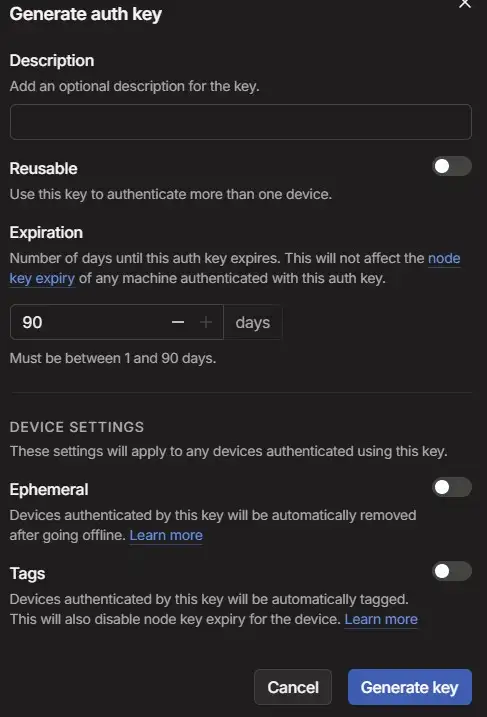
Step 4: Generate Auth key Tailscale Account
Generate an Auth Key for RDP on Tailscale Account. Go to settings -> keys -> Generate auth key and hit Generate key.

Step 5: Added a secret Variable
Go to the Settings option in the repository. Then go to the security section, find the “Secrets and variables” option & click on actions. Click “New Repository Secrets”.

Create a New secret with a secret name & secret ID, then click Add secret on github.

Step 6: Build Windows VPS
Go to the Actions section in the same repository. Then go to “set up a workflow yourself”.
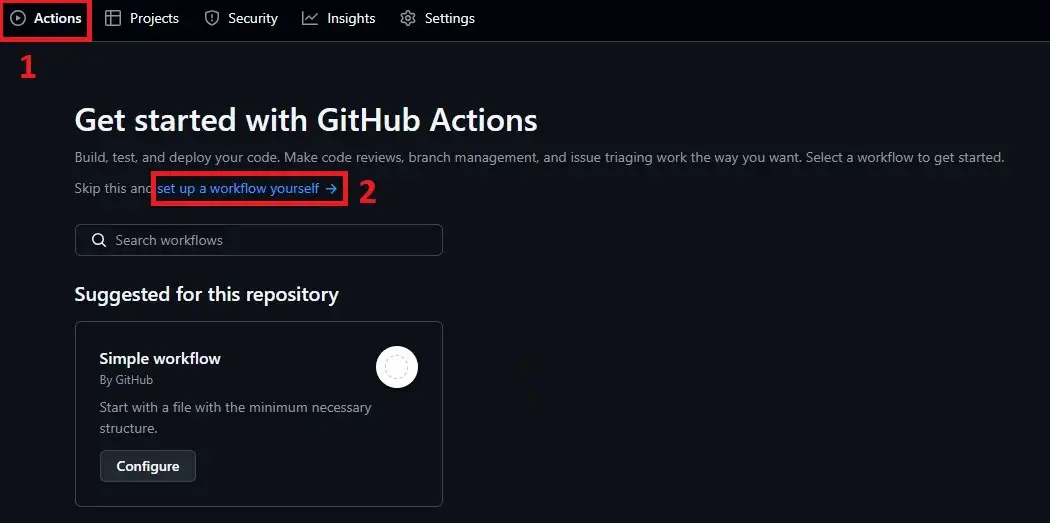
Input the latest Ubuntu Linux VPS code on “main.yml” to run Ubuntu Linux. code below here.
name: RDP

on: [push, workflow_dispatch]

jobs:
  kali-rdp:
    runs-on: ubuntu-latest

    steps:
      - name: Install desktop and xrdp
        run: |
          sudo apt-get update
          sudo apt-get install -y xrdp xfce4 xfce4-goodies
          echo "xfce4-session" > ~/.xsession
          sudo systemctl enable xrdp
          sudo systemctl start xrdp
          echo "runner:P@ssw0rd" | sudo chpasswd

      - name: Install Tailscale
        run: |
          curl -fsSL https://tailscale.com/install.sh | sh

      - name: Authenticate and bring Tailscale up
        run: |
          sudo tailscale up --authkey=${{ secrets.TAILSCALE_AUTHKEY }} --hostname=github-runner
          echo "Tailscale IP: $(tailscale ip -4)"

      - name: Keep session alive
        run: |
          echo " RDP session is ready!"
          echo " Username: runner"
          echo " Password: P@ssw0rd"
          echo " Tailscale IP: $(tailscale ip -4)"
          sleep 21600
then hit commite chenges.
Step 7: Run to build
go to the action section again, then click “RDP” then -> “run workflow” -> again “run workflow”.
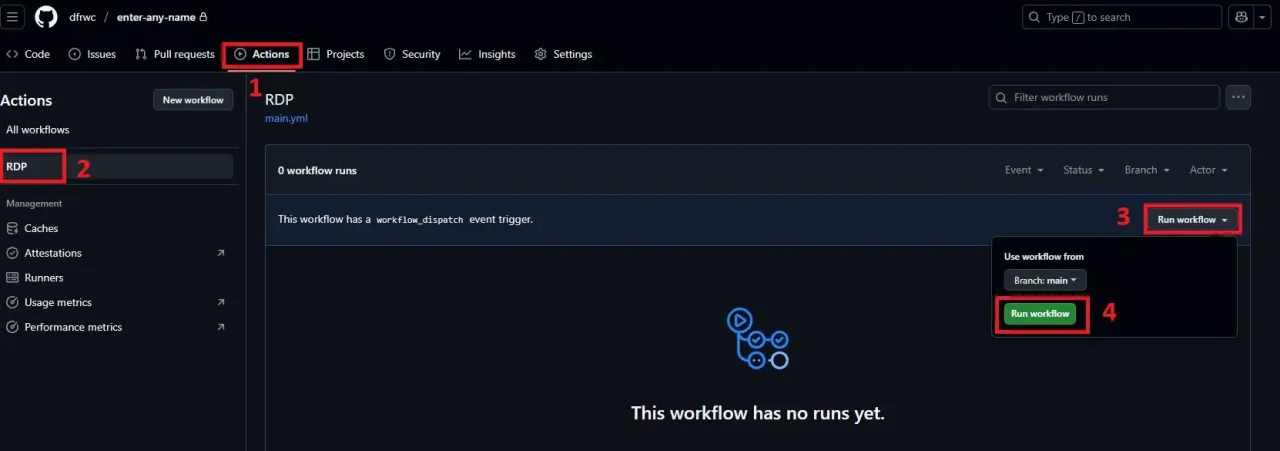
click again rdp

Again click Secure RDP
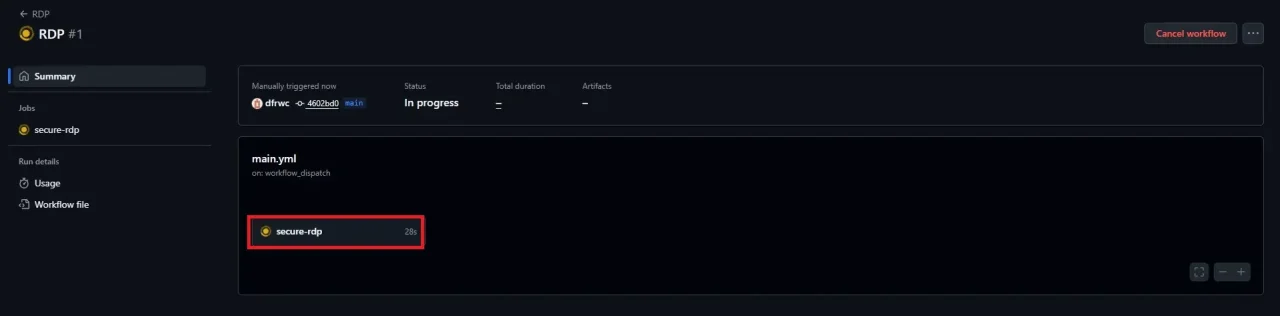
Finally, see the build process start. Here you see the IP address for RDP, User Name & password.
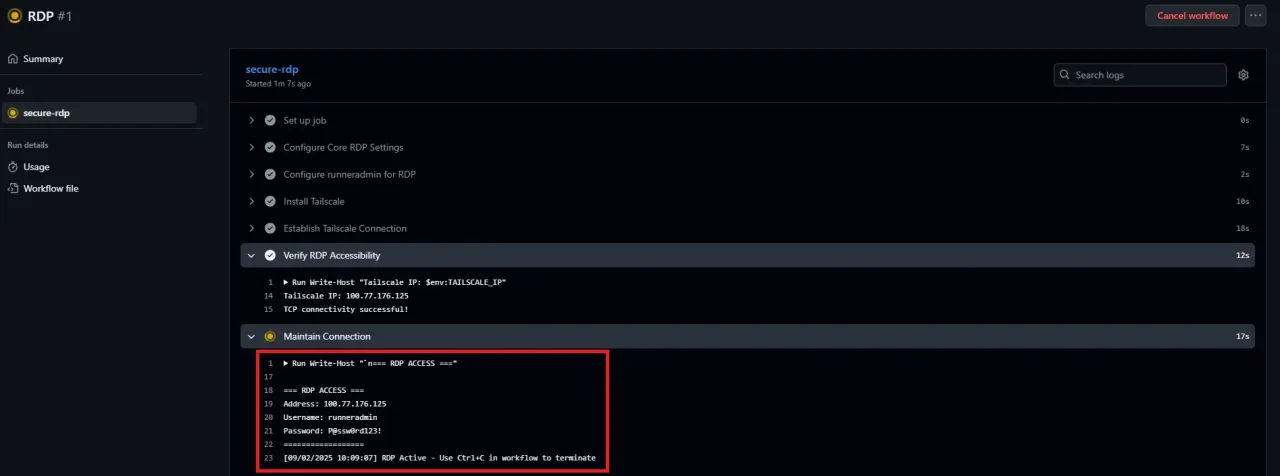
Step 8: Connect RDP
Open a remote desktop connection on a Windows machine.
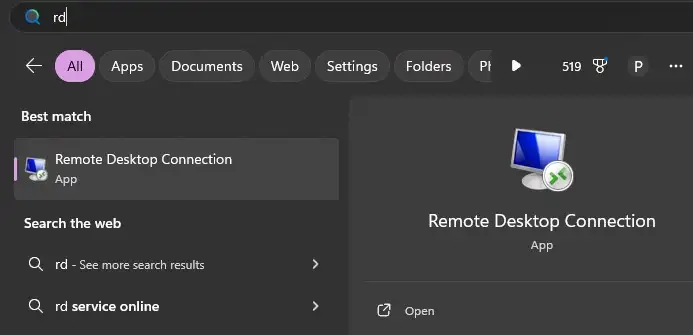
Input the IP Address and username, then click the “connect” button.

Then input the password.
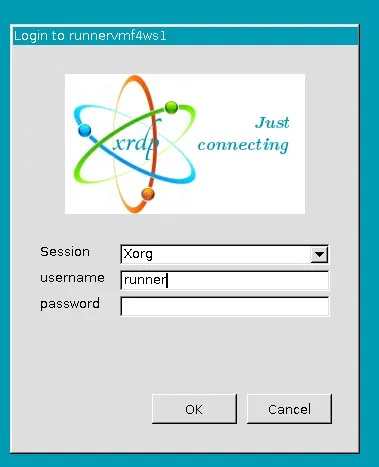
Wait a few seconds then click ok then view ubuntu latest version.

Best Alternatives to Free Linux VPS Hosting
1. Cheap Linux VPS with $1 Trials
If free options don’t meet your needs, consider these affordable alternatives:
- DigitalOcean: $5/month droplets with $100 credit for new users
- Linode: $5/month plans with $100 credit (60-day trial)
- Vultr: $2.50/month plans with frequent promotional credits
- Hetzner: €3.29/month VPS with excellent European performance
2. Student and Educational Offers
Students can access premium hosting through educational programs:
- GitHub Student Pack: Free credits for DigitalOcean, Azure, and more
- AWS Educate: $100+ credits for students and educators
- Microsoft Azure for Students: $100 credit with no credit card required
- Google Cloud for Education: Enhanced credits for academic institutions
3. Cloud Provider Free Credits
Major cloud providers offer substantial free credits for new users:
- Google Cloud: $300 credit for 90 days
- Microsoft Azure: $200 credit for 30 days
- IBM Cloud: $200 credit for 30 days
- Alibaba Cloud: $300-450 credit for new users
What to Look for in a Free Linux VPS Provider
When choosing a free Linux VPS hosting provider, consider these essential factors:
Key Selection Criteria:
- Resource Allocation: Adequate RAM (minimum 512MB), storage (10GB+), and bandwidth
- Root Access: Full administrative privileges for complete server control
- OS Variety: Support for popular distributions like Ubuntu, CentOS, Debian
- Uptime Guarantee: Minimum 99% uptime for reliable service
- Support Quality: Responsive technical support, even for free users
- Trial Duration: Reasonable time limits or permanent free tiers
- Upgrade Path: Clear pricing and easy migration to paid plans
- Data Center Locations: Servers close to your target audience
- Security Features: DDoS protection, firewall, and SSL support
- Backup Options: Data protection and recovery capabilities
Common Use Cases for Free Linux VPS
Free Linux VPS hosting serves various purposes across different user groups:
For Developers and Programmers
- Application Testing: Deploy and test web applications in production-like environments
- CI/CD Pipelines: Set up continuous integration and deployment workflows
- API Development: Host and test RESTful APIs and microservices
- Database Hosting: Run MySQL, PostgreSQL, or MongoDB for development projects
- Version Control: Host private Git repositories and collaboration tools
For Students and Learners
- Linux Administration: Practice server management and command-line skills
- Web Development: Learn LAMP/LEMP stack configuration and management
- Networking: Understand server networking, DNS, and security concepts
- DevOps Training: Experiment with containerization, orchestration, and automation
- Certification Prep: Hands-on practice for Linux certifications (LPIC, Red Hat)
For Small Businesses and Startups
- Website Hosting: Host small business websites and landing pages
- Email Servers: Set up custom email solutions for professional communication
- File Storage: Create private cloud storage solutions
- Monitoring Tools: Deploy uptime monitoring and analytics tools
- Proof of Concept: Test business ideas before investing in premium infrastructure
Frequently Asked Questions (FAQs)
-
Can I get a free Linux VPS without providing credit card details?
Yes, several providers like GratisVPS, BaeHost, and WoomHost offer free Linux VPS hosting without requiring credit card verification. These services typically require only email registration and may have activity requirements to maintain free status.
-
What are the typical limitations of free VPS hosting?
Free VPS typically have limited RAM (512MB-1GB), storage (10-20GB), bandwidth restrictions, and may include provider branding. Performance may be slower than paid plans, and support is often basic or community-based.
Conclusion: Choose the Best Free Linux VPS for Your Needs
Finding the right free Linux VPS no credit card solution depends on your specific requirements, technical expertise, and long-term goals. Whether you’re a student learning Linux administration, a developer testing applications, or a startup minimizing initial costs, there’s a suitable option available.
Our top recommendations for 2025:
- Best Overall (No Credit Card): GratisVPS for permanent free hosting with NVMe storage
- Most Generous Resources: Oracle Cloud Always Free for up to 24GB RAM
- Best for Learning: Google Cloud Platform with $300 credits and extensive documentation
- Enterprise Testing: AWS Free Tier for professional-grade infrastructure experience
- Students: BaeHost or educational programs through GitHub Student Pack
Pro Tips for Success:
- Start with providers that don’t require credit cards (GratisVPS, BaeHost, WoomHost)
- Keep your servers active to maintain free status
- Monitor resource usage to avoid service interruptions
- Have backup plans ready in case of service changes
- Consider upgrading to paid plans as your projects grow
Ready to get started? Choose a provider from our list above and begin your free Linux VPS journey today. Remember to read the terms of service carefully and understand any limitations before deploying production applications.
Related Articles You Might Find Helpful: