
Table of Contents
DHCP (Dynamic Host Configuration Protocol) is, how it works, and why it’s essential for managing IP addresses in modern networks. Simple explanation for beginners.
What is DHCP?
DHCP stands for Dynamic Host Configuration Protocol. It basically assigns a unique IP address to the network device. and added network configuration settings like (subnet mask, default gateway, and DNS servers) on the network device.
Why DHCP is Used:
- Automatic IP Assignment: Eliminates the need for manual IP configuration.
- Avoids IP Conflicts: Ensures that each device gets a unique IP address.
- Efficient Network Management: Makes it easy to manage large networks where devices join and leave frequently.
- Time-Saving: Especially useful in enterprise and home networks with many connected devices.
DHCP Port Number & Protocol
As DHCP communicates & establishes a connection between two devices that use two different port numbers. DHCP Server Use 67 Port Number & DHCP Client Use 68 Port Number.
DHCP Server Communicates using UDP ( User Datagram Protocol) Transmission. We know UDP can’t send acknowledgments, so it takes 4 way handshake.
How DHCP Works?
- A device (client) connects to a network and sends a DHCP Discover message.
- A DHCP server replies with a DHCP Offer.
- The client requests the offered IP with a DHCP Request.
- The server confirms with a DHCP Acknowledgment.

DHCP Packet Header
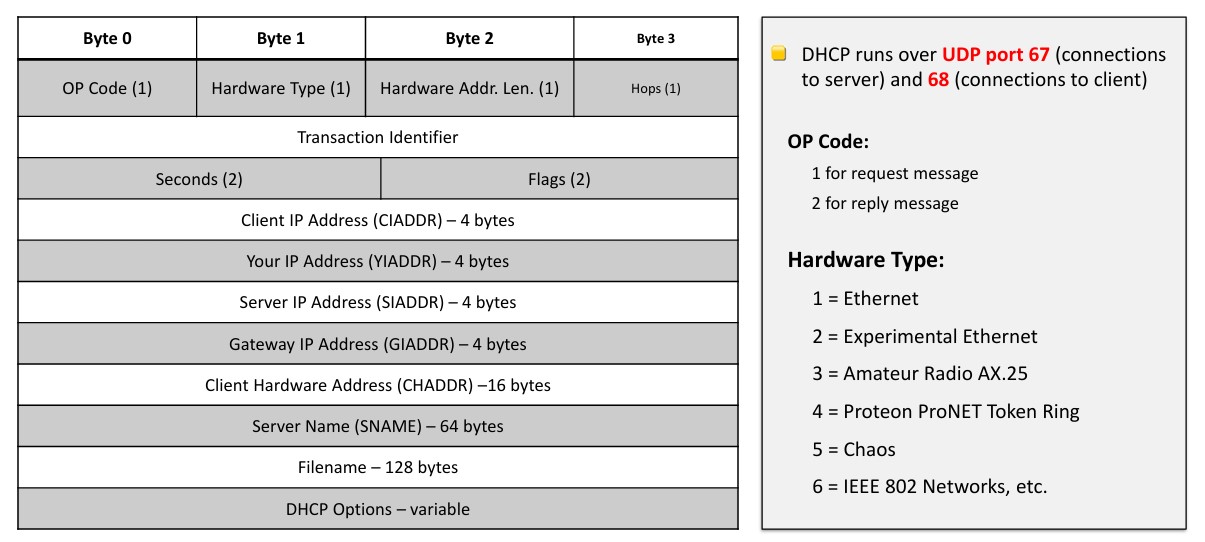
When a device (like your phone or laptop) connects to a network, it communicates with the DHCP server using specially formatted messages. These messages follow a specific structure that helps both the client and server understand each other.
The size of a DHCP header is 240 bytes. This includes the header’s basic fields, such as the message type, hardware type, hardware address length, hop count, transaction ID, seconds elapsed, flags, and various IP addresses. The maximum size of a DHCP relay packet is 1500 bytes to avoid fragmentation on Ethernet segments.
| Field Name | Size (bytes) | Description |
|---|---|---|
| Op | 1 | Indicates whether the message is a request (BOOTREQUEST) or a reply (BOOTREPLY). |
| Hardware Type | 1 | Specifies the hardware address type (e.g., Ethernet). |
| Hardware Address Length | 1 | The length of the hardware address (e.g., 6 for Ethernet). |
| Hops | 1 | Number of network hops the packet has traveled. |
| Transaction ID | 4 | Unique identifier for the DHCP request/reply pair. |
| Seconds | 2 | Number of seconds since the client started booting. |
| Flags | 2 | Indicates whether the server should broadcast the reply. |
| Client IP Address | 4 | Client’s IP address, or 0 if unknown. |
| Your IP Address | 4 | IP address offered by the server. |
| Server IP Address | 4 | IP address of the DHCP server. |
| GIAddr | 4 | Gateway IP address (optional, used in relayed DHCP). |
| CHAddr | 16 | Client hardware address. |
| SName | 64 | Server name (optional). |
| File | 128 | File name (optional). |
| Magic Cookie | 4 | A magic number (0x63538363) to identify the DHCP message. |
| Options | Variable | Contains various DHCP options such as the IP address, subnet mask, DNS server addresses, etc. |
Let’s look at the core components of a DHCP message:
🔢 1. OP Code (1 Byte)
- Purpose: Indicates the type of message.
- Values:
1= Request (sent by client)2= Reply (sent by server)
🧰 2. Hardware Type (1 Byte)
- Specifies the type of network hardware.
- Common values:
1= Ethernet (most used)2= Experimental Ethernet3= Amateur Radio4–6= Other special network types
📏 3. Hardware Address Length (1 Byte)
- Tells how long the hardware (MAC) address is.
- Example: Ethernet uses
6bytes for MAC addresses.
🔄 4. Hops (1 Byte)
Usually set to 0 by clients.
Used by relay agents to count how many devices the message has passed through.
🔑 Transaction Details
🔁 Transaction ID
- A unique number generated by the client to match requests and responses.
⌛ Seconds Elapsed (2 Bytes)
- Time (in seconds) since the client started the DHCP process.
🚩 Flags (2 Bytes)
- Used to request broadcast responses instead of unicast.
🧩 Key IP Addresses in the Packet
- CIADDR (Client IP Address): Used only if the client already has an IP.
- YIADDR (Your IP Address): The IP being offered to the client.
- SIADDR (Server IP Address): The address of the DHCP server.
- GIADDR (Gateway IP Address): If a relay agent is used, its address goes here.
🧾 Client and Server Info
- CHADDR (Client Hardware Address): The MAC address of the client.
- SNAME (Server Host Name): Optional server name (up to 64 bytes).
- Filename: Used for booting from the network (up to 128 bytes).
⚙️ DHCP Options (Variable Length)
This is one of the most flexible parts of a DHCP packet. It includes:
- Subnet mask
- DNS servers
- Lease time
- Default gateway
- And many other configuration settings
🌐 Network Communication Details
DHCP messages are sent using UDP (User Datagram Protocol), not TCP. Here’s how:
- Client to Server: Uses UDP port 67
- Server to Client: Uses UDP port 68
This distinction ensures that messages go to the correct device type—client or server.
🧠 Why DHCP Matters
Without DHCP, every device on your network would need manual configuration. That means:
- Assigning IP addresses by hand
- Configuring DNS and gateways individually
- High risk of IP conflicts
- Time-consuming setup
DHCP automates all of this, making it essential for both small home networks and large enterprise environments.
Conclusion
DHCP may seem like a behind-the-scenes technology, but it’s absolutely essential to keeping networks running smoothly. From assigning IP addresses to configuring key network settings, DHCP automates what would otherwise be a time-consuming and error-prone process.
By understanding the structure of a DHCP packet and how it communicates over the network, you’re not only demystifying a critical part of networking—you’re also building a strong foundation for more advanced topics in IT and cybersecurity.
FAQs: DHCP
-
Is DHCP secure?
Basic DHCP is not inherently secure. It can be vulnerable to spoofing or rogue servers unless enhanced with additional protections like DHCP snooping, IPsec, or authentication.
-
Can a network work without DHCP?
Yes, but every device would need to be configured manually. This is manageable for small networks, but impractical for larger or dynamic environments.
-
What happens if there is no DHCP server?
If no DHCP server is available, devices may assign themselves a default IP (using APIPA) or require manual configuration, which can lead to IP conflicts and connectivity issues.
-
What is a DHCP lease?
A DHCP lease is the amount of time a device can use the IP address assigned by the DHCP server. After the lease expires, the address may be renewed or reassigned.
-
What port does DHCP use?
DHCP uses UDP port 67 for messages sent to the server and UDP port 68 for messages sent to the client.